


giq GPU Inference Queue · open source · Apache‑2.0
On-premises inference management for workstation GPUs.
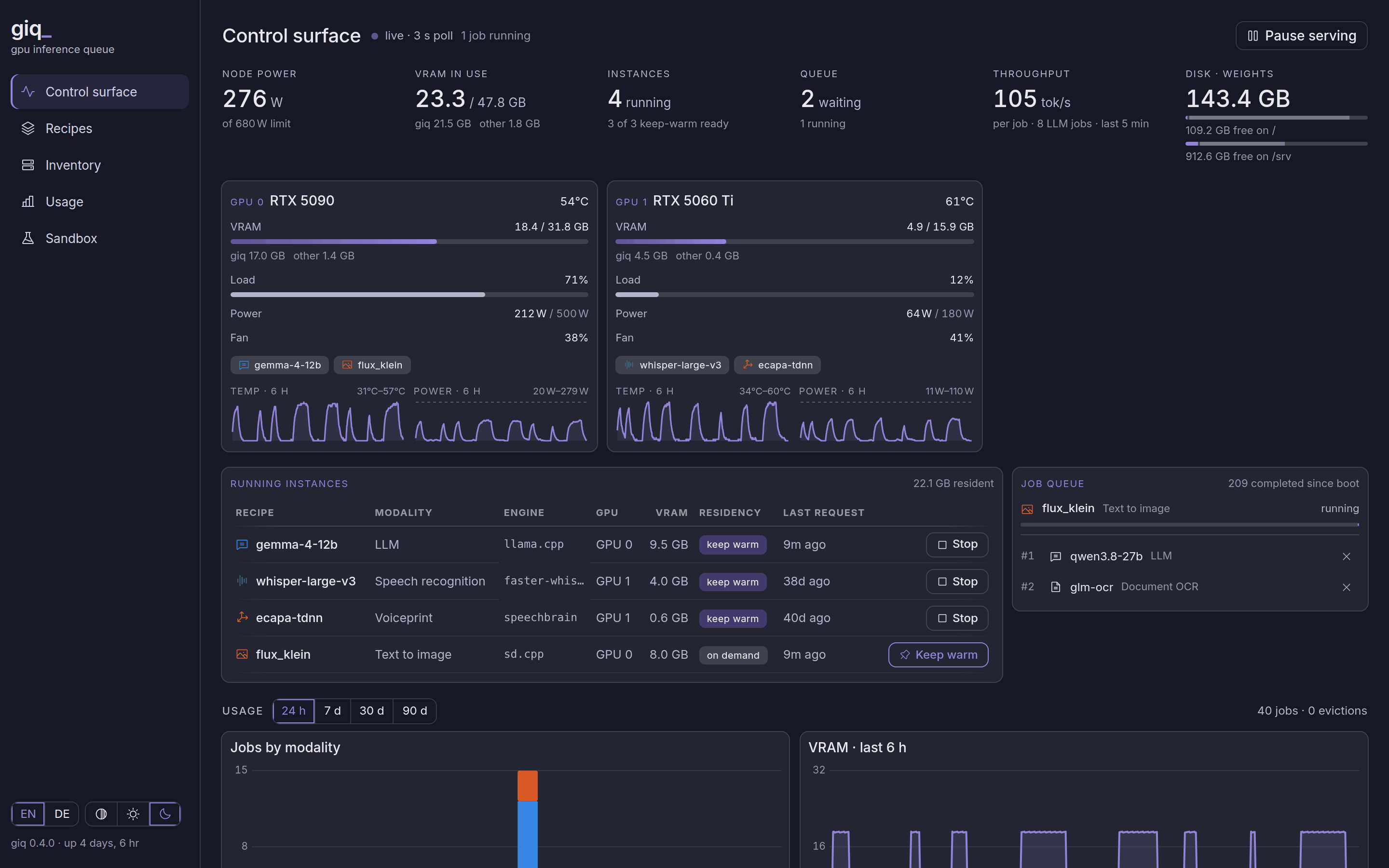
giq runs the AI models of all your applications on one or more local GPUs: language, speech, images and more out of the box, and your own modalities through plugins. It decides which card serves what, what stays loaded and what waits.


Why we built it
The inference layer for confidential on‑premises AI
We wanted to give our customers AI assistants for their engineering work, agents that know their documents, tools and processes. Most of that data can't leave the company, so the assistants run on premises, on inference that is isolated and transparent.
A dedicated inference server is a big investment before you know AI helps. Workstation GPUs are affordable, but one or two of them can't hold every model an assistant needs at once.
giq makes those cards enough: it decides which card serves what, what stays loaded and what waits, and takes more cards as the work grows.
Architecture
How giq fits in
Several applications, one giq instance, one or more GPUs. The applications talk to one API; giq runs each request on the right model and card, and sends nothing off the premises itself.
Swipe sideways to see the whole diagram.
giq today
What giq does
In use since February 2026. Out of the box it serves 10 modalities, from LLMs and vision to speech, OCR, depth and music, on llama.cpp, vLLM, stable‑diffusion.cpp and Python runtimes.
Running one model is straightforward; giq's work is in sharing the card: VRAM figures measured on real hardware, each engine in its own process, and as few evictions as possible.
One queue
Every request goes through the same job queue, so two clients never load models at the same time.
OpenAI-compatible
Chat, Responses, transcription and speech endpoints. Existing clients only need a new base URL.
Recipes
One YAML file per model: weights, engine, parameters and a VRAM figure, measured or marked as an estimate.
Residency per recipe
Keep warm, on demand or off. It can be changed at runtime and survives restarts.
Several GPUs
A recipe can be bound to one card. It is then gated, loaded and evicted only there.
Room for other GPU users
giq shares the workstation. When someone needs the GPUs to themselves, one call pauses giq and frees every card.
Plugins
Bring your own modalities
Engineering work brings its own GPU workloads: Gaussian splatting, structure from motion, point-cloud processing and more.
Each can become a giq plugin, a Python package with its engine, recipes, API routes and dashboard panel, sharing the card under the same queue, VRAM gate and eviction as everything else.
Plugins can stay private: giq is Apache‑2.0, so a proprietary plugin can run on the open core.

Privacy
Every job recorded, no content stored
giq records which jobs ran, on which model and for how long. Prompts, images and outputs stay in memory only, and no request goes to a hosted API.
A test keeps it that way: it sends a marker string through every logging path and fails if it turns up in anything giq writes.
# tests/test_privacy.py
CANARY = "zqx-private-prompt-canary-8f3a"
Open source
Developed in the open
The part that runs the models, decides what is loaded and sees every request should be open to inspection. giq is open source for that reason, and so are the engines it runs: llama.cpp, vLLM and stable‑diffusion.cpp. Anyone can check what happens to a request, from the API to the GPU.
Examples
See how it works
Three setups, step by step: a shared workstation, a meeting transcriber on a 16 GB card, and a news desk that summarises, illustrates and reads out articles. The figures come from giq's recipes.
- gemma-4-12bLLMkeep warm9.5 GB
- whisper-large-v3Speech to textkeep warm4.0 GB
- ecapa-tdnnVoiceprintkeep warm0.6 GB
- empty
01/09Three recipes kept warm
gemma‑4‑12b for chat, whisper‑large‑v3 for transcription, ecapa‑tdnn for speaker voiceprints. 14.1 of 31.8 GB in use.
Pick a setup, or step through with the controls.


Similar needs?
If you run several models for several applications on your own hardware, and they don't all fit on the card at once, giq may save you from writing this yourself.
Requires Linux, an NVIDIA GPU, Python 3.11+ with uv, and llama.cpp for LLMs. Details are in the README.
EU AI Act
Operating in the EU? Let's talk about AI Act compliance for your application.
What the AI Act asks of you depends on each application: its purpose, its users, and whether its output leaves the company. giq already marks generated images as AI-generated and logs every job without storing its content. We can work out with you which technical measures your application needs. info@vik.works
We cover the technical measures: marking, logging, documentation. The legal assessment of your application stays with your counsel.
giq is developed by vik.works UG (haftungsbeschränkt) and contributors.
The background images on this page were generated with giq, using the zimage recipe.
Product and model names are trademarks of their respective owners; giq is not affiliated with or endorsed by them.